
ChartLogic Help CenterChartLogic Help CenterChartLogic Help CenterChartLogic Help Center
  • Create a Case
  • Manage Cases
  • Contact Us
  • Account
  • Login

Administrative Settings

  • Administrative Settings
  • Search
  • Document Owner Search
  • Advanced Search
  • Working with Documents
  • Scanning Documents
  • Indexing Documents
  • Uploading Video Files to Document Management
Home EHR Document Management Administrative Settings

Administrative Settings

The administrative settings in Document Management allow users to set document types, Staff and Groups.

Setting Document Types
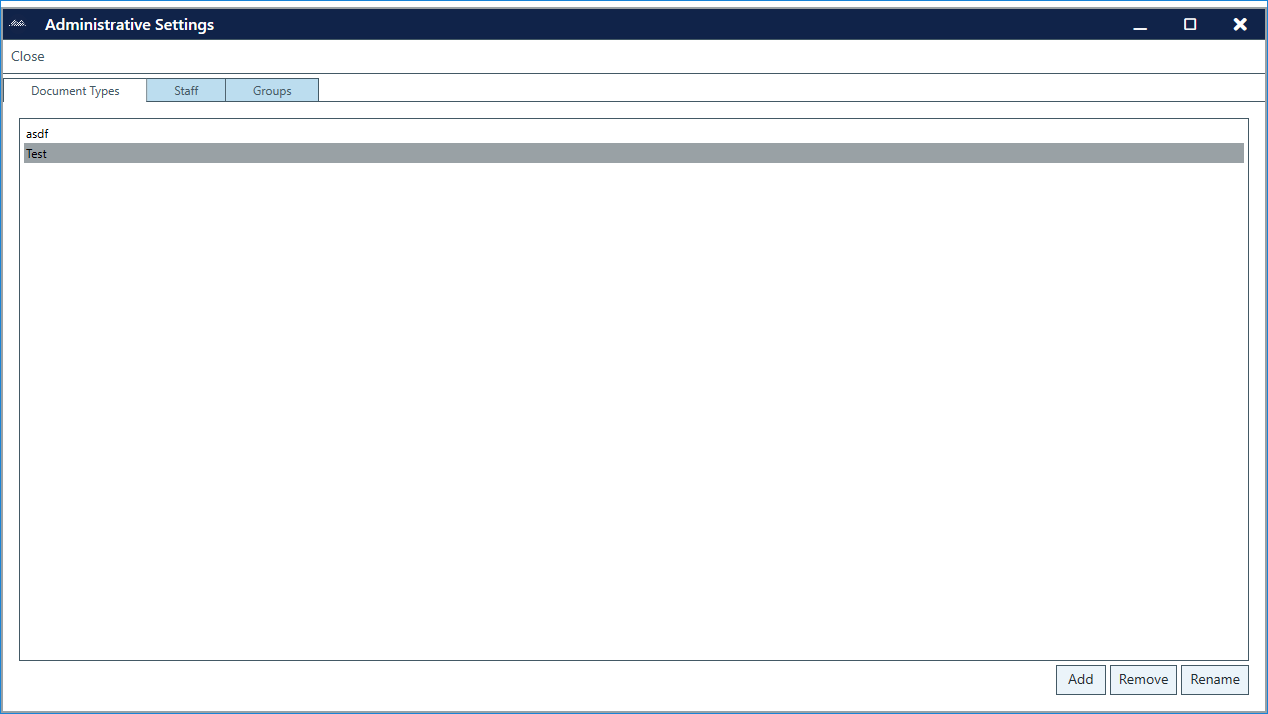
To add a Document Type:
  1. Go to Configure > Document Management.
  2. With the Document Management tab open, click on Document Types.
  3. Click Add.
  4. Enter Document Type name. The name will appear in the Document Types window.

Note:

  • Sections can be renamed or removed by clicking on the Rename and Remove buttons at the bottom of the screen.

USER COMMUNITY

Share ideas with other ChartLogic users!

Login Now

Popular Articles

  • ChartLogic Installation
  • Methods for Achieving Better Voice Recognition
  • ICD-10 Setup & Training
  • Checking your Meaningful Use Reports

Quick Links

  • Practice Management Login
  • Remote Service Login
  • Release Notes
  • Account Management Updates

Free Medical Billing Analysis

Have you scheduled your free practice analysis yet?
Get Started
CALL 800.838.5899
EMAIL SUPPORT

Quick Links

  • Practice Management Login
  • Remote Service Login
  • System Requirements
  • Release Notes
  • Account Management Updates
  • Support Login

Connect

1220 E 7800 S, Floor 3
Sandy, UT 84094
Toll-Free (888) 337-4441

Medsphere

  • Privacy Policy
  • Terms
  • Sitemap
ChartLogic is the Ambulatory Division of © 2019 Medsphere Systems Corporation.
  • Create a Case
  • Manage Cases
  • Contact Us
  • Account
  • Login
ChartLogic Help Center